Menu
HomeAudio ModeVideo ModePricingPluginCharts

WOLFLOW / DISK MANAGEMENT

Manage disk space.
Audio and video projects.

Footage. Samples. Renders. Cache. See what takes up your SSD and decide what to archive, with your projects in view.

Explore disk space

Windows & macOS · Disk Management is a PRO feature

Disk ManagementPRO
01Campaign — final cut128 GB

Premiere Pro

02Titles & motion74 GB

After Effects

03Color session46 GB

DaVinci Resolve

Interactive illustration · fictional projects and sizes. Shared sizes are not additive.

YOUR CREATIVE TOOLS. ONE OVERVIEW.

Premiere Pro ✳ After Effects ✳ DaVinci Resolve ✳ Ableton Live ✳ FL Studio ✳ Logic Pro

FROM FULL DRIVE TO CLEAR PICTURE

The project file is just the beginning.

A tiny Premiere project can reference gigabytes of footage. A beat can share samples with dozens of sessions. A cache can grow outside the project folder. Looking at file sizes alone leaves part of the story out.

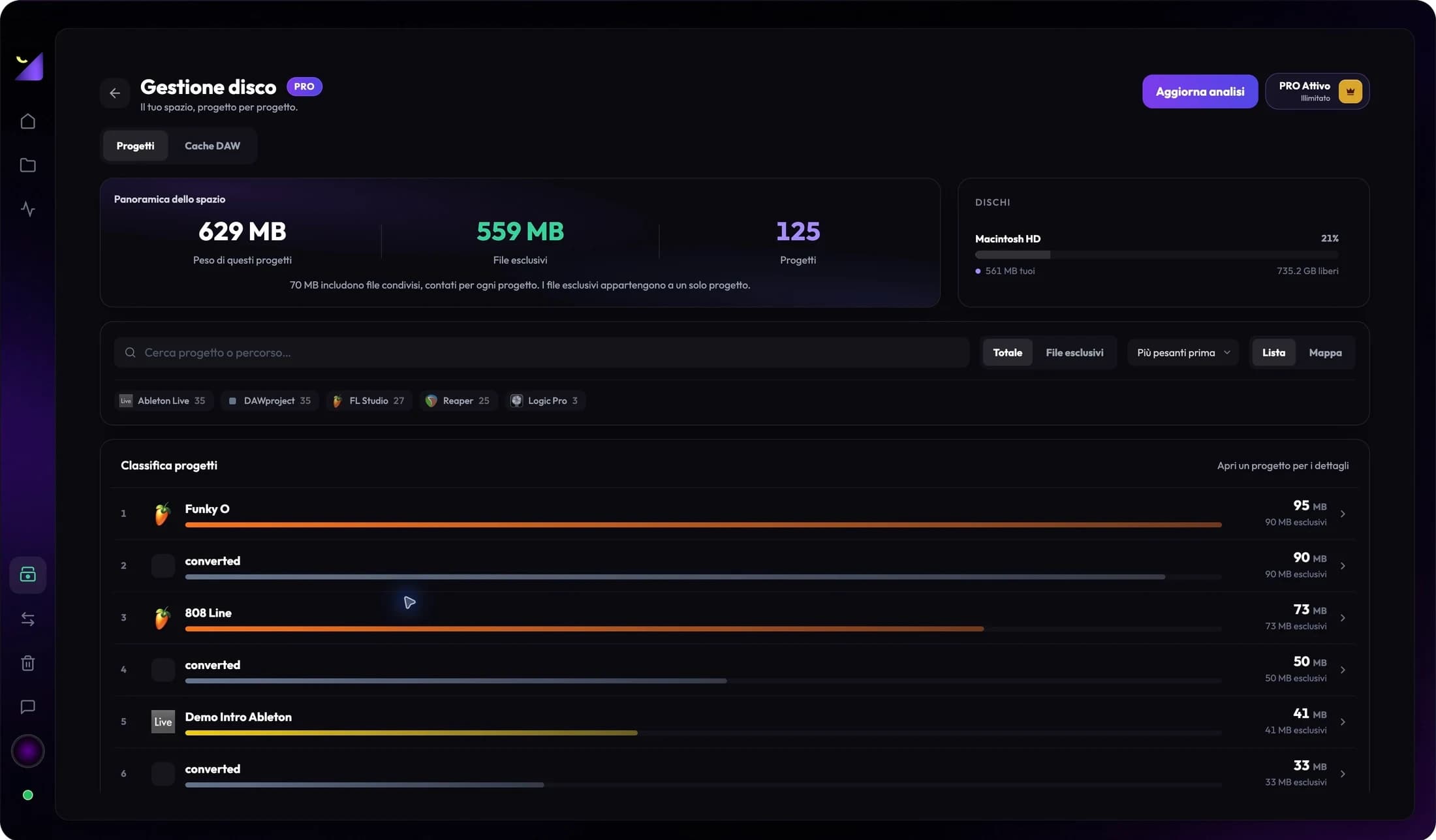
Wolflow PRO ranks analyzed projects by size, separates exclusive and shared files and shows free space on involved drives. Recognized cache locations add context, so you can plan the next step.

Inside WolflowActual app screenshot · audio projects
Wolflow Disk Management showing project sizes, exclusive and shared files and free drive space

A BETTER STORAGE ROUTINE

Find it. Understand it.
Then archive it.

01 / 03

Start with the projects that take up the most space.

A small Premiere or After Effects project file can point to gigabytes of footage and renders. Wolflow ranks analyzed projects by size, so you can find completed jobs to archive before your SSD fills up.

What you learn

Project size · exclusive files · shared files · free drive space

02 / 03

Understand what can be rebuilt. Keep what matters.

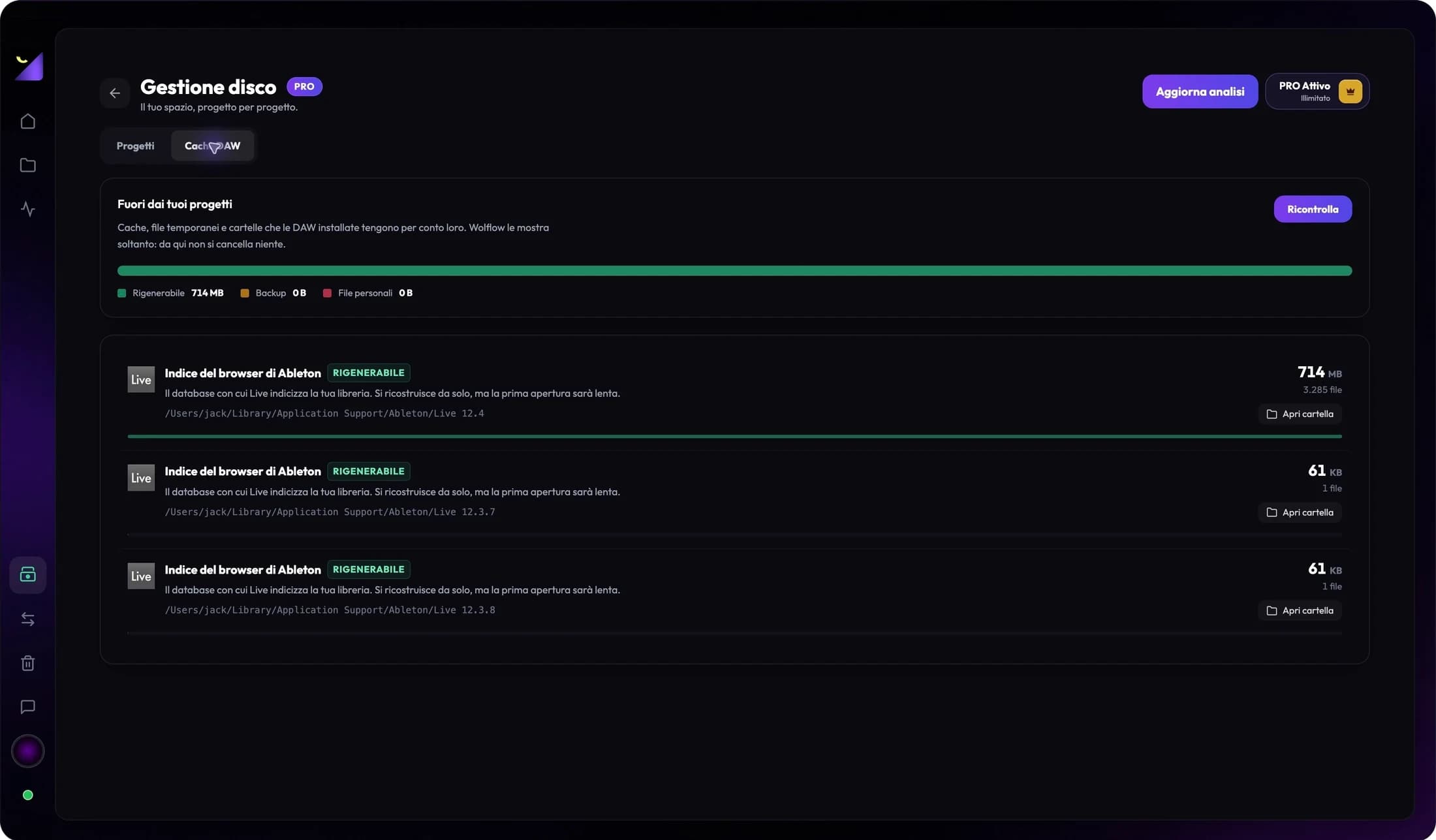
Recognized cache categories help separate temporary data from originals and saved versions. Wolflow shows sizes and locations; manage cleanup in your editing software. It does not delete your files automatically.

Regenerable cache

Premiere .cfa / .pek · After Effects Disk Cache · DaVinci CacheClip

  • Can be rebuiltRecognized temporary cache. Removing it can require previews to be rebuilt.
  • KeepOriginal footage, recordings, project files, useful autosaves and backups.
  • Check firstShared files and external media can still be needed by other projects.
03 / 03

Prepare a backup before archiving.

Choose your applications and a destination drive in Backup Manager. Include media within project folders and verify the copy. Check externally referenced assets separately before moving or removing originals.

Your next step

Choose destination → copy → verify → archive
Your files stay in your hands. Read-only analysis. No automatic deletion. Check custom cache paths in your editor and verify backups before moving originals.

THE STORAGE FIELD GUIDE

SSD full? Start here.

Practical answers for video editors, motion designers and music producers.

Pr

Premiere Pro

01

Premiere taking up too much space? Start with media and cache.

A .prproj file describes your edit, while footage, audio, proxies and exports can take up much more space. Check media folders and rank analyzed projects by size to identify the largest jobs.

What to check

Media Cache includes conformed audio .cfa and peak files .pek. Check the location in Media Cache settings and manage cleanup in Premiere. Required caches will be rebuilt; keep footage and auto-saves separate.

Adobe documentation
Ae

After Effects

02

After Effects disk cache: find where the gigabytes go.

Cached previews are different from .aep files and project assets. Check the Disk Cache folder and size limit in Media & Disk Cache settings to understand why your drive fills up.

What to check

After Effects can empty disk cache from its settings or its memory and cache purge command. Previews will need rebuilding. Keep source files, compositions and saved versions separately.

Adobe documentation
Dr

DaVinci Resolve

03

Render cache, proxies and footage are different things.

An edit can use original footage, proxies, optimized media and render cache. Inspect recognized folders, including CacheClip at expected locations, and check custom paths in Resolve.

What to check

Review render cache in your editor before removing it. Before archiving a job, verify that your backup contains the project and required media, including assets on external drives.

♫

FL Studio · Ableton · Logic · REAPER

04

How to find your largest DAW projects.

A .flp, .als, .logicx or .rpp file alone does not show your session’s storage footprint. Recordings, samples, bounces and versions can take up gigabytes. Rank analyzed sessions by size and inspect exclusive and shared files.

What to check

Shared samples may still be used by other beats. Collect media with your DAW’s tools and verify the copy before moving a session. Wolflow helps you identify projects worth reviewing.

BEFORE YOU MOVE A PROJECT

A backup deserves a check.

  1. 01Choose the software and destination drive in Backup Manager.
  2. 02Include media inside project folders and check externally linked assets separately.
  3. 03Verify the copy and required media before archiving or removing originals.

STRAIGHT ANSWERS

Less guessing.
More space to create.

How do I find large Premiere and After Effects project files?

Start with analyzed project sizes, then inspect linked media and cache folders. Wolflow PRO Disk Management ranks projects by size and shows exclusive files, shared files and free space. Recognized cache folders have sizes and paths; check custom locations in the editing software.

How can I free disk space without losing projects?

Separate regenerable caches from original media, projects and backups. Manage cache cleanup in the application that created it. Back up completed work, check shared files and external media, and verify the copy before moving or deleting originals.

Can I delete Premiere .cfa and .pek files?

These are Media Cache files: conformed audio and peak files. Premiere provides tools to manage cache cleanup and rebuilds required files. Check the path in settings and keep original footage, audio and auto-saves separate.

Does Wolflow automatically delete files or caches?

No. Storage analysis is read-only. Wolflow shows sizes, paths and categories for recognized folders and lets you open them. Manage cleanup in the source application; automatic space recovery is not promised.

Can shared file sizes be added across projects?

Not always. Several projects can reference the same media, so adding their sizes can count files more than once. Inspect exclusive and shared files before estimating how much space archiving a project could recover.

Does backup include media on other drives?

Include project files also copies media inside project folders. Inclusion of all externally referenced media is not guaranteed. Check external assets separately and verify the copy before removing originals.

Is Disk Management included in the free plan?

Disk Management is a PRO feature. Backup Manager allows one use every 7 days on Free with a connected account and quota verification. Check the plans for current availability and limits. Wolflow is a desktop app for Windows and macOS.

YOUR NEXT PROJECT STARTS HERE

Make room for what’s next.

Discover Disk Management and Backup Manager in Wolflow PRO.

Explore PRO plans