Getting started
How Wolflow works: a guide to every feature
Wolflow is a Windows and macOS desktop app that catalogs creative projects, reads available data, helps manage storage and prepares conversions, backups and handoffs. Start with the problem you need to solve and use this guide as a map of the features.
From scattered files to a searchable catalog
At first launch, choose Audio Mode or Video Mode, create a profile and select a layout. The Bridge reads local files and updates the library through scans and watched folders. You can add paths on other drives; those drives must be connected and accessible. Your selected mode determines the projects and statistics you see.
Find ideas, versions and client work
Projects offers list and grid views, search, application filters, tags, favorites and status. Artist, cover art and Stuff collections give work an identity. The four status stages are customizable. Trash hides projects from the catalog and lets you restore them; it does not free disk space.
Understand what a session contains
Audio Mode shows BPM, duration, tracks, MIDI, plugins and recordings when the format exposes them. Link a bounce to listen and measure LUFS, true peak and dynamics; advanced analysis adds spectrum, stereo, transients and MIX/MASTER reports. Video Mode reads timelines, FPS, cuts, effects and offline media where available.
- Analyze audio projects: BPM, tracks, MIDI and plugins
- Which plugins did I use? Catalog, charts and compatibility
- Link exports and bounces to music projects
- Analyze LUFS and true peak and compare two masters
- Advanced audio analysis: spectrum, stereo, dynamics and noise
- Analyze video projects: timelines, cuts, effects and media
Change DAWs and collaborate
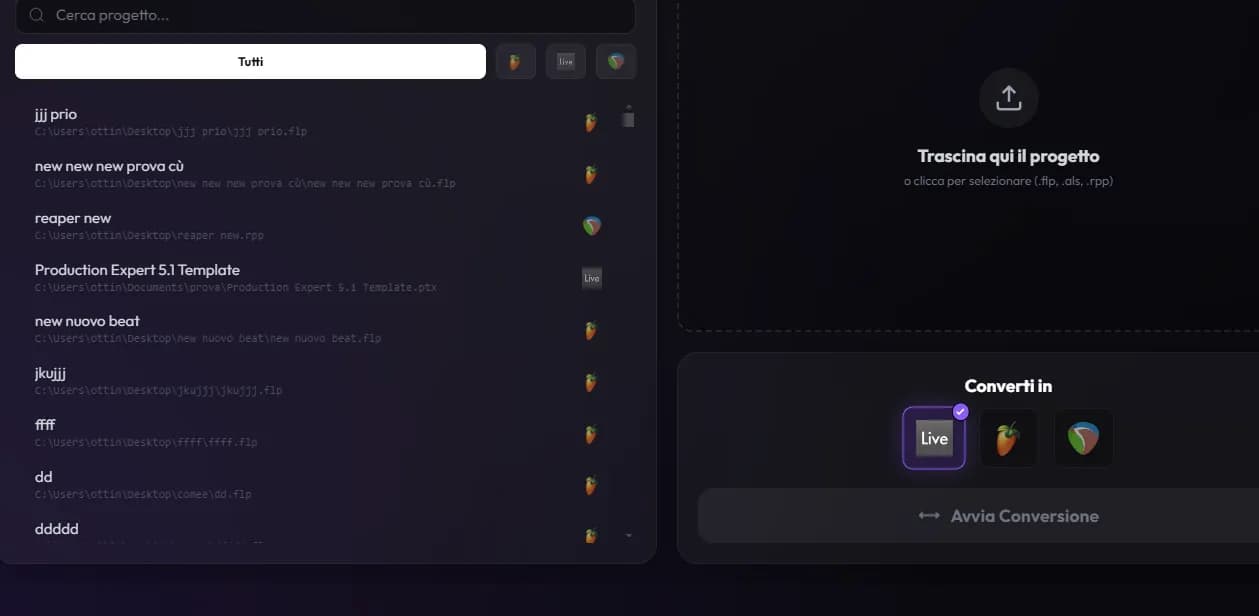
The Converter rebuilds supported elements in another format. Plugin Preflight checks plugins for the destination. Stems mode uses the source DAW to render audio and prepare an AAF. These workflows differ: project conversion preserves compatible editable data, while stems preserve rendered audio. Project transfer prepares a package for another Wolflow user or a local ZIP.
Understand storage and protect your work
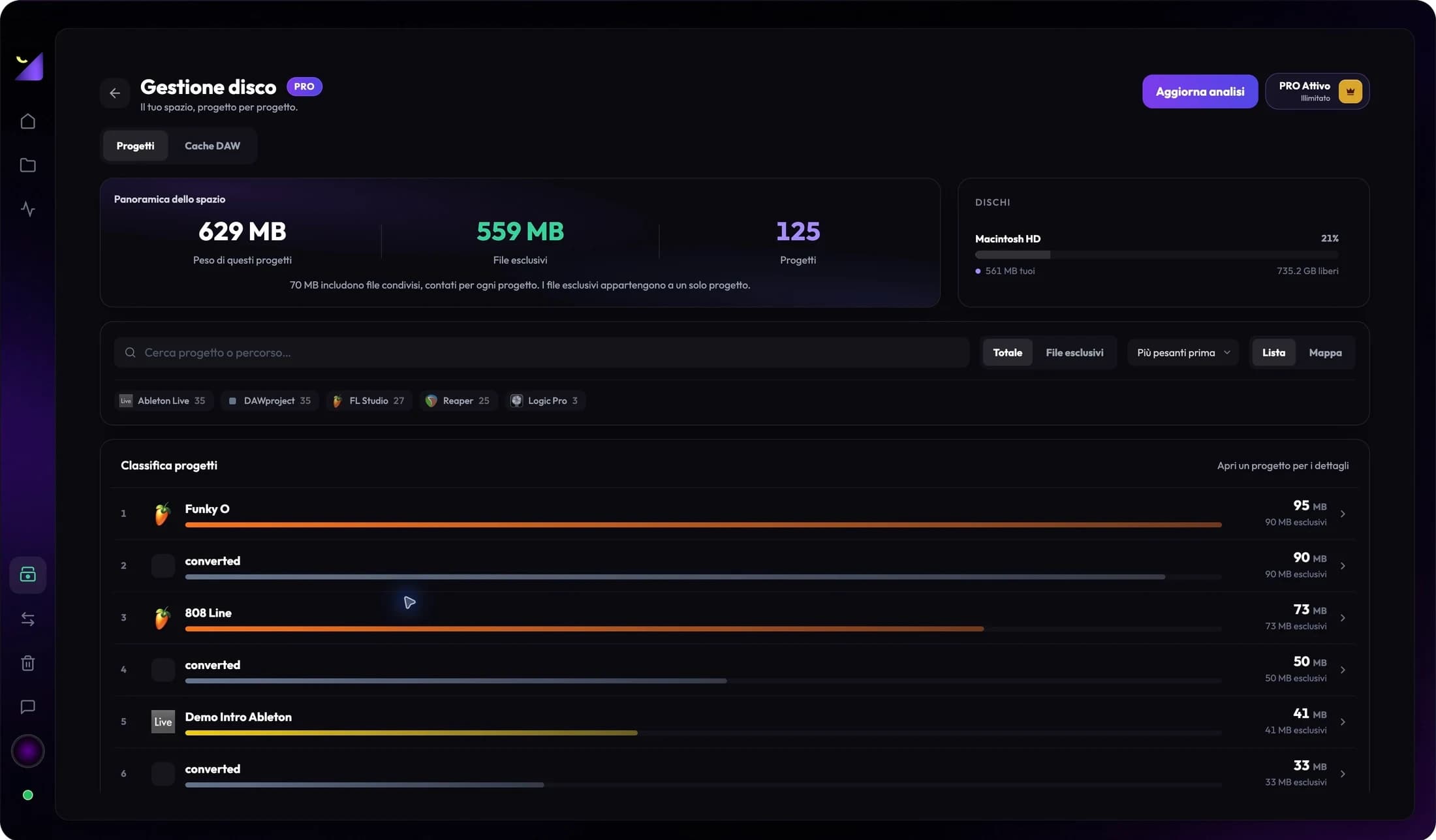
PRO Disk Management measures recognized projects and linked files, distinguishes total, exclusive and shared size, and shows caches outside project folders. Analysis is read-only. Backup Manager copies selected projects to your chosen destination; including project files does not guarantee collection of every external library. Before archiving, test the copy in its DAW or editor.
- Find heavy projects and identify shared files
- DAW caches: FL Studio, Ableton, Logic and REAPER storage
- Premiere Pro taking up space: media and cache
- Clear After Effects disk cache and manage your SSD
- Free disk space in DaVinci Resolve: cache and media
- Back up audio and video projects, including media
- Archive projects to an external drive without losing media
Follow production, studio work and results
The dashboard combines widgets, trends, estimated work time, application usage and plugin rankings. Flow Coach suggests next actions from data; points, tasks and levels show consistency. Studio Mode adds a studio profile; PRO Earnings tracks fees and payments. Spotify and YouTube show available public data. Wrapped summarizes synced statistics when enabled for the account.
- Track work time on audio and video projects
- Customize the Wolflow dashboard and read its widgets
- Flow Coach, Flow Points, levels and tasks: how to use them
- Studio Mode and Earnings: organize client projects
- Spotify and YouTube widgets: follow an artist and channel
- Wolflow Wrapped: statistics, identity and sharing
A practical workflow for your first project
- Scan a real folder and confirm the project appears in the correct mode.
- Assign artist, tags and status; link a demo or export so you can recognize it by sound.
- Open the available analysis and choose a useful check: compatibility, audio levels, storage or backup.
- Verify the result in the source or destination application before delivery or archiving.
Frequently asked questions
Does Wolflow replace a DAW or video editor?
No. It organizes and analyzes projects and prepares management operations. Recording, editing, mixing and media repairs remain in your creative software.
Does every application support the same features?
No. Cataloging, metadata reading, conversion and stem rendering have different compatibility. Check the specific workflow and commands available in your version.
Try it with your next project
Wolflow is a desktop app for Windows and macOS. Free conversions and backups require a connected account to verify the 7-day quota; Disk Management is a PRO feature. Check the plans for availability.
 Wolflow